Python 文档字符串
Python 文档字符串(Document String)是一个字符串字面量,它是模块、函数、类或方法中的第一个语句。
如何编写 Python 文档字符串?
Python 文档字符串用三重双引号(""")括起来。让我们来看一些在 Python 中编写文档字符串的示例。
1. Python 函数文档字符串示例
def multiply(a, b):
    """This method multiplies the given two numbers.

    Input Arguments: a, b must be numbers.
    Returns: Multiplication of a and b.
    """
    return a * b
2. Python 类文档字符串示例
class Employee:
    """Employee class is used to hold employee object data.

    Methods:
        __init__(self, emp_id, emp_name)
        print()
    """

    def __init__(self, emp_id, emp_name):
        """Employee Class Constructor to initialize the object.

        Input Arguments: emp_id must be int, emp_name must be str
        """
        self.id = emp_id
        self.name = emp_name

    def print(self):
        """This method prints the employee information in a user friendly way."""
        print(f'Employee[{self.id}, {self.name}]')
3. Python 模块文档字符串示例
假设我们已经在docstrings.py文件中定义了上述函数和类。每个 Python 脚本也是一个模块。我们可以将该模块的文档字符串定义为
"""
This module shows some examples of Python Docstrings

Classes: Employee
Functions: multiply(a, b)
"""
如何访问 Python 文档字符串?
我们可以通过特殊属性 doc 访问文档字符串值。下面我们来看看如何访问上面定义的文档字符串值。
1. 访问 Python 函数文档字符串
print(multiply.__doc__)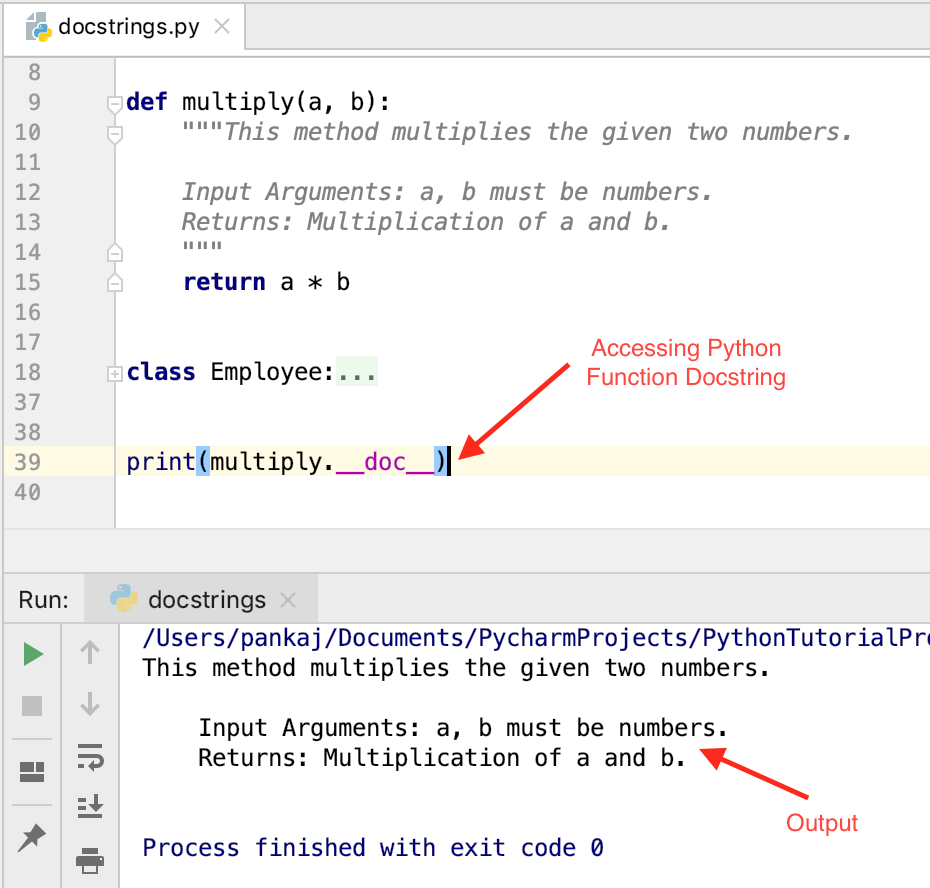
2. 访问 Python 类和方法文档字符串
print(Employee.__doc__)

print(Employee.__init__.__doc__)

print(Employee.print.__doc__)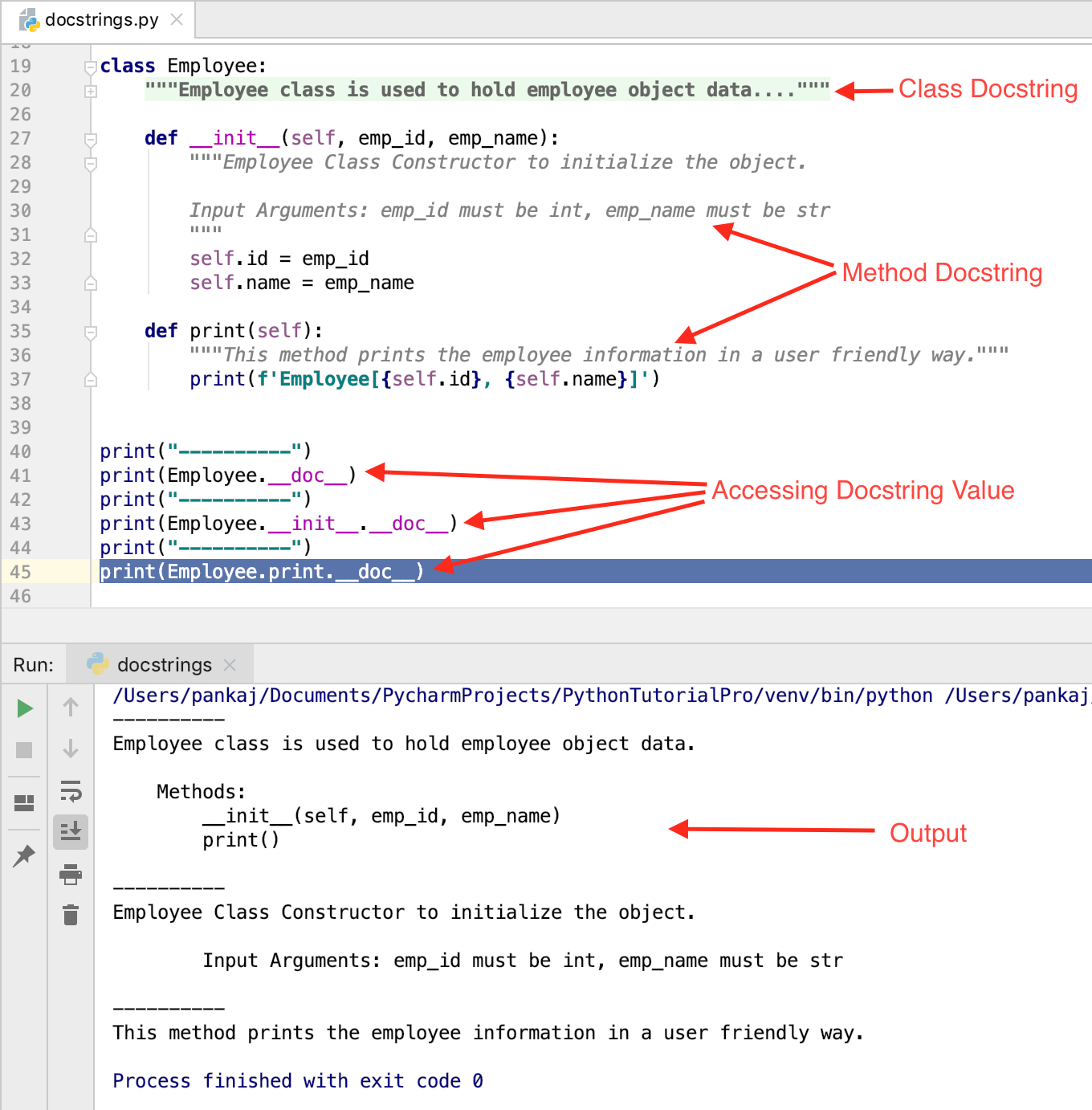
3. 访问 Python 模块文档字符串
我们需要导入 docstrings 模块。然后我们可以使用 doc 属性访问其文档字符串值。我们在导入 docstrings 模块之前注释掉了上面的 print 语句,以避免执行 print() 语句。
>>> import docstrings
>>>
>>> docstrings.__doc__
'\nThis module shows some examples of Python Docstrings\n\nClasses: Employee\nFunctions: multiply(a, b)\n'
>>>
>>> docstrings.Employee.__doc__
'Employee class is used to hold employee object data.\n\n    Methods:\n        __init__(self, emp_id, emp_name)\n        print()\n    '
>>>
>>>
>>> docstrings.multiply.__doc__
'This method multiplies the given two numbers.\n\n    Input Arguments: a, b must be numbers.\n    Returns: Multiplication of a and b.\n    '
>>>
>>>
>>> docstrings.Employee.print.__doc__
'This method prints the employee information in a user friendly way.'
>>>
Python 单行文档字符串
- 当 Python 文档字符串用单行定义时,它被称为单行文档字符串。
- 开头的引语和结尾的引语在同一行。
- 文档字符串值前后没有空行。
- 最佳实践是在文档字符串末尾添加句点。
- 它最适合用于不需要指定很多内容的小型实用函数。
- 提供有意义的文档字符串,以详细说明函数及其输出。例如:
def reverse_str(s):
    """Reverses the input string and returns it."""
    pass
Python 多行文档字符串
- 当文档字符串值跨越多行时,称为多行文档字符串。
- 多行文档字符串的最佳实践是先写一行摘要,然后空一行,再写更详细的解释。
- 摘要行可以与开头引言在同一行,也可以在下一行。
- 整个多行文档字符串的缩进与其第一行中的引号相同。
Python 文档字符串最佳实践
- Python 脚本的文档字符串应该明确说明如何使用该脚本。当脚本执行时缺少参数或参数错误,应该打印文档字符串。
- Python 模块文档字符串应列出所有类、函数、异常以及对其他模块的依赖关系。
- Python 函数的文档字符串应明确说明函数的行为、输入参数、返回类型和异常处理。如果函数调用有特定限制,也应在函数的文档字符串中加以说明。
- 类的文档字符串应列出所有方法和属性。如果它继承自超类,则应提供详细信息。
- 如果类方法重写了超类方法,则应明确指出。
- Python 区分大小写。因此,请确保函数参数名称与函数定义中的名称完全一致。
Python 文档字符串格式
文档字符串的格式没有硬性规定。但是,遵循特定的风格会让你的代码看起来更美观。目前有两种常见的文档字符串格式。
1. 诗句格式
这与 Javadoc 风格的注释非常相似。它包含方法描述、参数、返回值以及引发的异常的详细信息。
def multiply(a, b):
    """This method multiplies the given two numbers.

   @param a: this is the first param
   @param b: this is the second param
   @return: returns after multiplying a with b
   @raise TypeError: raised when any of the params is not a number
    """

    return a * b
2. reStructuredText (reST) 格式
这是一种新的样式,PEP-287 推荐使用。Sphinx 使用这种样式生成文档。
def multiply(a, b):
    """This method multiplies the given two numbers.

   :param a: this is the first param
   :param b: this is the second param
   :return: returns after multiplying a with b
   :raise TypeError: raised when any of the params is not a number
    """

    return a * b
PyCharm 文档字符串快捷方式
PyCharm IDE 会自动为方法生成 reST 格式的文档字符串,只需在方法声明后输入三个双引号并按回车键即可。
由于 PyCharm IDE 支持自动生成 reST 风格的文档字符串,并且 PEP-287 也推荐使用这种格式,因此您应该按照这种格式编写文档字符串。
为什么你应该遵循 Python 文档字符串规范?
可以使用 __doc__ 属性访问 Python 文档字符串。构建一个系统来解析文档字符串并生成项目模块、类和函数的文档非常容易。因此,您应该遵循PEP-257中规定的文档字符串指南。
我们可以使用文档字符串来注释多行内容吗?
我见过很多滥用文档字符串来添加多行注释的情况。Python 本身并不支持多行注释。如果你想让注释分多行显示,请在每行开头加上井号 (#)。请勿滥用 Python 文档字符串。
总结
Python 文档字符串提供有关函数、类或模块的有用信息。我们可以使用 __doc__ 变量访问文档字符串的值。我们应该使用 reST 格式来编写方法的文档字符串。